“ Imagine you could model a complex structure in a few seconds — and immediately see deflection, reactions, and load paths drawn over the model.”

Early design moves faster than most analysis workflows. This piece sketches a practical way for structural reasoning to join the conversation without slowing it down. Using Structural Studio — a lightweight, full‑3D, linear‑static environment for frames and trusses — the team speaks in ordinary language, the AI drafts a solvable model, and the engine overlays evidence directly on the geometry. The aim is legibility, not hype, so choices can be discussed while they are still cheap.
What this is
A shared workspace for architects and structural engineers, with an AI assistant acting as translator. It turns short, plain‑English briefs into editable structural models and returns immediate linear‑static responses: deformation, support reactions, and internal force diagrams. Because outputs are drawn on the model, cause and effect stay visible.
How it actually works
Say it: the architect drops a one‑minute brief — spans, heights, where the structure meets the ground, and the loads that matter.
full 3d structure of space truss roof 10 x 10 m span 1 m high support by 4 dendriform columns 3 m high
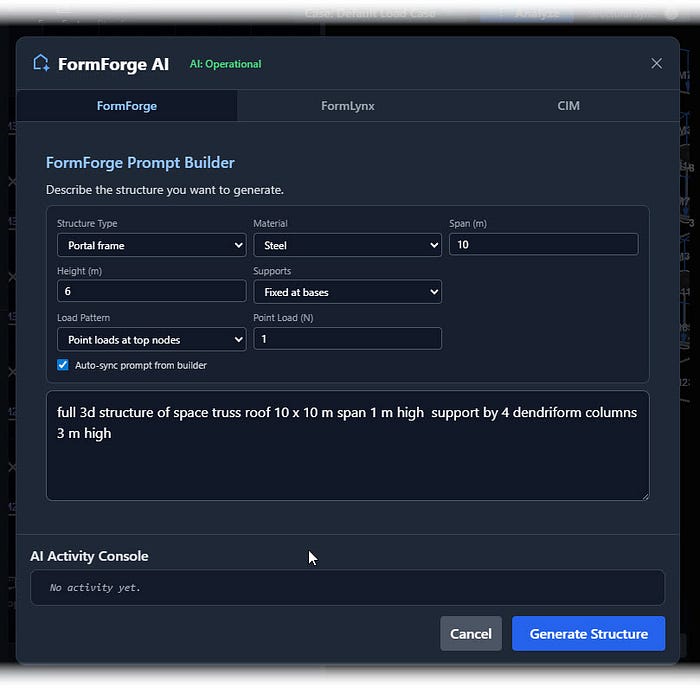
See it: the AI drafts a live, solvable 3D schema — nodes, members, supports, and loads — ready to edit.
Check it: the structural engineer sanity‑checks fixity, connectivity, magnitudes, and combinations; the architect confirms spatial intent survived translation.
Clear it: preflight checks flag gaps and inconsistencies in plain language, with quick links to fix.
Run it: solve and watch deformation, reactions, and internal forces draw themselves on the model.
Share it: name the variant, keep a trace, and compare alternatives side by side.
A studio scene in one paragraph
Two six‑meter bays, four‑meter columns, pinned bases, uniform gravity on the beams, a lateral push at the top nodes. The AI places coordinates and elements as expected. Preflight notes missing self‑weight and load combinations; the engineer adds them and re‑runs. Results show acceptable drift and moments concentrated in the beam under pinned bases. The next move is obvious: try base fixity on the middle frame, compare envelopes, weigh drift against foundation demand and headroom. Notes and images go straight into the design log.
What this changes in practice and teaching
In meetings, the conversation shifts from impressions to mechanisms. With results overlaid on geometry, load paths and boundary effects become tangible, and alternatives can be weighed quickly. In class, the rhythm becomes hypothesis → evidence → explanation. Students must state intent, agree on a clean schema that passes preflight, and read results against first principles. The habit that forms is not “push button, get answer,” but “say what you expect, then show why the result makes sense.”

What to expect from the scope
The environment is full‑3D and linear‑static with small‑deflection assumptions. That narrow scope is deliberate: it keeps outputs explainable and fast enough for studio critiques and feasibility talks. When the project moves into materials, codes, and nonlinearity, the early choices are already documented with clear structural evidence.
Closing
The most useful role for AI at the start is not to decide, but to help teams see cause and effect sooner. By translating intent into a transparent model and returning immediate evidence, this workflow keeps authorship with the people in the room — and keeps the structure in the conversation from the first sketch.
Try: StructuralStudio.net
